

Troubleshooting
1. Sharing Wired Network Among iPhone, iPad, and Mac Devices
1.Ensure device compatibility
Step 1: Go to System Settings → type "Internet" in the search bar → click "Internet Sharing".
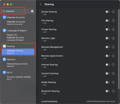
Step 2: Click the exclamation mark (!) next to the option.
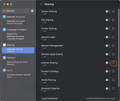
Step 3: Check the devices you want to share the network with, then click "Done".
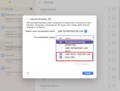
Step 4: Turn on "Internet Sharing".
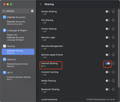
Step 5: Wait a few seconds, then confirm that devices connected via VCD10 can access the internet.
2. VCD30 Compatibility with iMac
The FusionDock Ultra supports the following iMac models:
2021 models: 2 variants
2023 models: 2 variants
2024 models: 2 variants
Total supported models: 6
Please note the following display output limitations:
Only the 2024 iMac models with four Thunderbolt ports support multi-display output with VCD30.
The other five iMac models, when used with VCD30, support only one external display output.
3. Compatibility with Unverified Devices
1.Pre-sales Inquiry: Customers are advised to consult the brand store of their device to confirm compatibility with the key specifications of the VCD30.
The key interface specifications of the FusionDock Ultra are as follows for your reference:
-Thunderbolt 5 port
-Up to 80Gbps bandwidth
-Supports USB 3.2 Gen 2 (10Gbps)
-Supports PD 5V/3A (15W) power delivery
-Supports BC1.2 5V/1.5A charging
We recommend providing the above interface specifications to the official customer support or technical team of the device you plan to use, to confirm whether it supports connection via a Thunderbolt 5 dock or a dock with equivalent interface specifications.
2. Post-Sales Compatibility Check
To help identify the cause of the issue, please follow the steps below:
Step 1: Connect the device directly to your MacBook’s Thunderbolt port and check whether it works properly.
Step 2: Then, connect the same device to the Thunderbolt port on the VCD30 and test it again.
Result Evaluation:
-If the device does not work when connected directly to the MacBook, the issue is likely related to the device itself.
-If the device works when connected directly to the MacBook but does not function through the VCD30, this may indicate a compatibility limitation between the device and the dock.
Please let us know the results of your testing, and we will be happy to assist you further.
If you encounter any issues while using the docking station please contact iVANKY technical support.
Email: support@ivanky.com
When contacting iVANKY technical support for technical issues, please provide the following information:
a. Your docking station serial number.
b. Your current macOS version.
c. Model of your MacBook.
d. Description of the issue and the devices connected to the dock.