

Troubleshooting
1. USB-C port not working
Step 1: Check whether the dock’s LED indicators are on.
Step 2: please unplug and reconnect the following cables:
-The cable connecting the device to the docking station
-The USB-C cable between the docking station and the Mac
-The DC power cable
Step 3: Connect a known-working USB-C device to the port to check if it works. If it does, the dock is not the issue.
Step 4: Try a different USB-C cable to see if the original cable is faulty.
Step 5: Test other USB-C ports on the dock to confirm they are working.
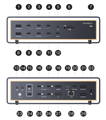
Step 6: Step 6: If the port still does not work, please contact the iVANKY support team and provide the following information so we can check for possible device compatibility issues:
-macOS version
-Device that cannot be used and its model
-Purchase link (if available)
Example feedback format for individual ports:
-Ports 7 / 10 not working
-MacBook Model: MacBook Pro 14 M2 MAX 2023
-macOS: Ventura 13.3.1
2. USB-A port not working
Step 1: Check whether the dock’s LED indicators are on.
Step 2: please unplug and reconnect the following cables:
-The cable connecting the device to the docking station
-The USB-C cable between the docking station and the Mac
-The DC power cable
Step 3: Connect a known-working USB-A device to the port to check if it works. If it does, the dock is not the issue.
Step 4: Try a different USB-A cable to see if the original cable is faulty.
Step 5: Test other USB-A ports on the dock to confirm they are working.
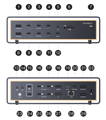
Step 6: If the port still does not work, please contact the iVANKY support team and provide the following information so we can check for possible device compatibility issues:
-The port number that is not working
-macOS version
-Device that cannot be used and its model
-Purchase link (if available)
If you encounter any issues while using the docking station please contact iVANKY technical support.
Email: support@ivanky.com
When contacting iVANKY technical support for technical issues, please provide the following information:
a. Your docking station serial number.
b. Your current macOS version.
c. Model of your MacBook.
d. Description of the issue and the devices connected to the dock.